Magic Tiles 3™ - Piano Game
- 4.6
- Rating
- 500.00M
- Installs
- Free
- Price
 Analysis by App-foxy
I spent time with Magic Tiles 3™ as a quick-play music game, and its appeal became clear almost immediately: it turns familiar songs into a test of timing, attention, and nerve. You tap the moving piano tiles as they reach the target area, trying to keep the song alive without missing. It is simple to understand, but the later pressure can make a short session surprisingly intense.
This is a free game from AMANOTES PTE. LTD. in the music category, aimed at players aged Everyone 10+. It has built a very large audience, with over 500 million installs, a 4.6 average from around 3.4 million ratings, and roughly 109 thousand written reviews. Those figures do not automatically make it right for everyone, but they do reflect how easily the basic tap-and-rhythm idea connects with mobile players.
How the piano-tile gameplay feels in everyday use
The basic loop is wonderfully direct. I choose a song, watch the tiles arrive, and tap them in rhythm. There is no long tutorial to study and no complicated control scheme to remember. That makes it especially good for small gaps in the day: a few minutes while waiting for a bus, a short break between tasks, or a relaxed session with headphones before bed.
In-Depth Coverage of Magic Tiles 3™ - Piano Game
The important distinction is that this is not simply a music player with visual decoration. The song becomes something I have to perform. A familiar melody can help me anticipate the next sequence, but recognition is not enough. I still need to watch the screen and react at the correct moment. When the pace rises, even a song I know well can expose a weak point in my concentration.
I found the first few attempts useful for learning the shape of a track rather than chasing a perfect result. Instead of treating every miss as failure, I paid attention to where my hands became tense or where I started looking too far ahead. That small change in approach made the game feel less random and more like a compact rhythm exercise.
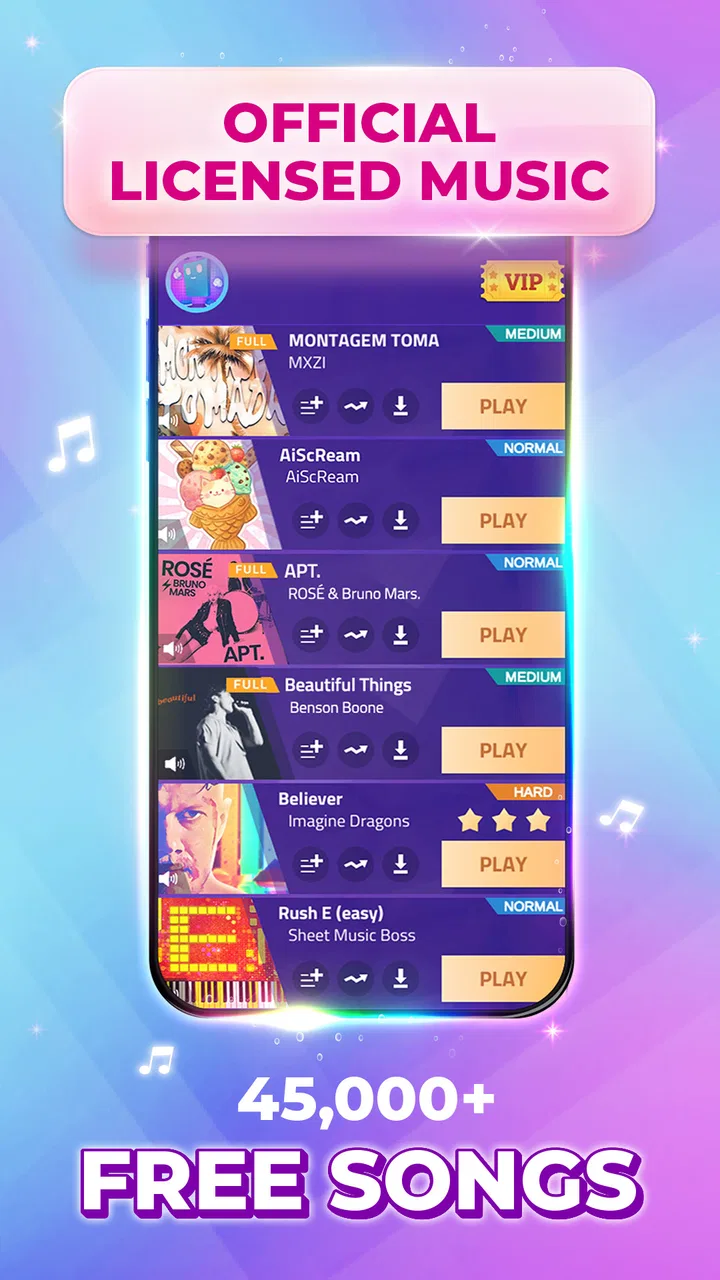
The store summary points toward piano tapping, K-pop rhythm, Christmas songs, offline play, and the Rush E challenge. That mix gives the game a broader personality than a single-style piano app. Someone attracted by recognizable seasonal music may enjoy it for a different reason than a player who wants a demanding rhythm challenge.
Why the controls are easy to pick up but difficult to master
Touch controls are a natural fit here. I do not need to learn virtual buttons or swipe patterns; the screen itself shows where the next action belongs. The simplicity also makes the game approachable for people who do not normally play mobile games. The challenge comes from accuracy and consistency, not from understanding a complicated interface.
There is a useful mental trap in the design. The early part of a song can feel comfortable, encouraging me to relax, but a faster passage can arrive before I am ready. I learned to keep my attention on the next few tiles rather than assuming that a good opening guarantees an easy finish. That habit is one of the most practical ways to improve.
Another helpful adjustment is to avoid playing with one fixed posture. When I held the phone too low or used an awkward grip, my tapping became less precise. A stable position, clean screen, and headphones at a comfortable volume made more difference than I expected. These are small details, but rhythm games magnify small control problems.
Progress feels rewarding, but it can also create pressure
The strongest motivation is personal improvement. I often wanted to replay a song not because I had failed completely, but because I knew exactly where the run had slipped. That kind of near-success is effective: the target feels close enough to pursue without requiring a long commitment.
At the same time, repeated attempts can become tiring. The game asks for sustained attention, and a player who keeps restarting immediately after a mistake may turn a fun session into a frustrating loop. I get better results by taking a short pause after several poor runs, then returning with a calmer hand. In a rhythm game, impatience usually produces more mistakes.
The pressure is not only about speed. It also comes from maintaining a rhythm while the screen becomes visually busy. Players who prefer relaxed puzzle games may find the later sections stressful, especially if they dislike repeating the same song to improve a result. I would not recommend it as a soothing game for everyone; it is better described as light entertainment that can become competitive with itself.
For younger players, the Everyone 10+ rating is worth noticing. The game is accessible, but the rapid tapping and pressure may not suit every child. I would treat it as a title to try together first, particularly if the player is sensitive to failure or tends to spend impulsively inside free games.
What spending means here
The game is free to download and play, while its listed in-app purchases range from $0.99 to $49.99 per item. That is the main spending context I would want a new player to understand before starting. The presence of optional purchases does not by itself tell me how necessary they are, so I would approach the game with a clear personal limit rather than assuming that every extra is required.
My practical advice is simple: begin without buying anything and first decide whether the core tapping feels enjoyable. If the basic songs and retry loop already hold your attention, you can judge later purchases on their actual value to your play style. If the free experience does not feel satisfying, spending more is unlikely to fix the underlying mismatch.
You May Also Like

 AccuWeather: Weather Radar
AccuWeather Review: A Quick, Clear Forecast for Everyday Decisions
For everyday plans, the best forecast is the one you can understand quickly. AccuWeather makes rain timing, radar, and local conditions easy to act on, with a few trade-offs.

 Hill Climb Racing
Why Hill Climb Racing Still Turns Crashes Into One More Run
A tiny car, a bumpy hill and one more upgrade: Hill Climb Racing keeps resurfacing because its simple chaos makes every near-miss feel personal.

 AliExpress - Shopping App
AliExpress Makes Global Shopping Feel Personal, but Shoppers Bear the Risk
AliExpress turns a global marketplace into a pocket-sized discovery engine. Its reach is useful, its shopping loop compelling, and its trade-offs easy to miss.

 Lords Mobile: Kingdom Wars
Lords Mobile Is a Kingdom-Building Routine, Not a Quick Match
A case-by-case verdict on the building, battles, device demands, and social commitments that make Lords Mobile rewarding for some players and exhausting for others.

 PDF Scanner app - TapScanner
TapScanner Makes Paperwork Easier to Capture, Check, and Share
TapScanner makes scanning with a phone feel less like a rescue operation and more like a dependable step in getting work done. Its capture tools are useful, though not flawless.

 Block Blast!
 Shows How Much a Puzzle Game Can Leave Out
A quiet grid game shows why puzzle players increasingly value instant clarity, repeatable skill and low-pressure play—and where the genre still needs to catch up.
More From Our News Desk
View All News


I also recommend separating musical enthusiasm from purchase decisions. A favorite song or a tempting challenge can make an immediate purchase feel more urgent than it really is. Waiting until the end of a session gives me a better chance to decide calmly. On a shared device, I would also check the purchase controls so a child cannot buy something accidentally.
Because the listed price range covers individual items rather than describing a single required entry fee, I would not present the game as pay-to-play. I would describe it more carefully: it is a free rhythm game with optional spending, and the sensible way to use it is to enjoy the free core first and treat purchases as discretionary.
Is the competition fair?
For me, the fairest part of the experience is the directness of the challenge. The main skill is visible: I either tap the tiles in time or I do not. That makes personal bests feel meaningful, because improvement comes from learning the track, controlling my reactions, and staying focused rather than from mastering a complicated character system.
There is still a difference between fair difficulty and comfortable difficulty. A track can be fair while remaining demanding, and a missed tile can feel harsh when my attention slips. I appreciate that distinction because it prevents me from blaming the game every time I make a mistake. However, players who want a consistently gentle experience may prefer a slower music game with less emphasis on repeated precision.
Compared with a traditional piano-learning app, this is much more about reflexes and entertainment than musical education. It does not replace practicing scales, reading notation, or learning proper finger technique. Compared with a general casual game, it offers a stronger connection between sound and action. Compared with a dedicated competitive rhythm title, its appeal is the quick entry point: I can start tapping without first investing time in a large rule set.
That makes the game a good middle ground. It is more skill-based than a passive song collection, but less formal than a serious instrument-training tool. I would choose it for a lively break, a challenge with friends nearby, or a way to test my reaction speed. I would choose something else if my goal were structured music lessons, deep composition, or a completely pressure-free session.
Small techniques that improve a session
One of the most useful habits I developed was looking at the path of the tiles rather than staring at the exact tile under my finger. Peripheral vision helps me prepare for the next movement, while tunnel vision makes every tap feel like an isolated emergency. This is especially helpful when a sequence accelerates.
I also found that sound and touch should support each other. With headphones, the beat can help me establish a rhythm, but I should not rely on audio alone because visual timing still matters. If the environment is noisy, the game becomes more dependent on sight. If the screen is distracting, listening carefully can help me settle into the pattern. Switching emphasis between the two senses is a useful way to diagnose why a run is failing.
Another non-obvious trade-off is replay timing. Immediately repeating a difficult song can preserve the pattern in my memory, but it can also preserve the tension in my hands. A short break often improves accuracy more than another rushed attempt. I treat a failed run as information: where did I lose the beat, and was the problem speed, posture, distraction, or fatigue?
For an everyday scenario, imagine having ten minutes before an appointment. I would choose one familiar track, play a couple of focused attempts, and stop before frustration takes over. That is a better use of the game than opening it without a limit and discovering that a short break has become an hour of increasingly tense retries.
What I would want to know before installing
The current version is 12.116.201, and the minimum operating system listed is Android 7.0. That makes the compatibility requirement relatively clear for Android users with older devices, although the real comfort of play will still depend on the phone’s screen response and general condition. A device that struggles with touch input can undermine a rhythm game even when it technically meets the operating-system requirement.
The game was released on February 24, 2017, so it is not a new experiment in mobile rhythm design. That maturity is part of its appeal: the central idea has had time to reach a broad audience. It also means I approach it as an established pick for quick music play rather than expecting the depth or novelty of a brand-new genre invention.
Offline music play is highlighted in the store summary, which is useful for people who want entertainment during travel or in places with unreliable connectivity. I would still prepare the songs and settings I need before leaving a connection, rather than assuming every part of the experience will behave identically in every situation. The practical benefit is greatest when I plan ahead instead of treating offline access as an afterthought.
The song direction also matters. Players drawn to K-pop, Christmas music, or the Rush E challenge may find an obvious entry point. Someone who mainly wants a carefully curated catalog in one specific genre should inspect the available selection personally before committing to the game as their main music app. The variety is attractive, but personal taste will decide whether it remains interesting after the first few sessions.
I would also keep expectations realistic about what the rating tells me. A 4.6 average and a huge number of ratings show strong overall approval, but they do not guarantee that I will enjoy every song, difficulty spike, or purchase option. Reviews are useful for spotting common frustrations, while my own first free session is a better test of whether the tapping rhythm suits me.
Who should play it, and who should skip it?
I recommend it to casual players who want a game they can understand in seconds but revisit for gradual improvement. It is particularly suitable for people who enjoy music, quick reflex challenges, and the satisfaction of turning a near miss into a better run. It can also work well as a shared challenge when friends compare how far they can get on the same song.
I would be more cautious recommending it to someone seeking genuine piano instruction. The visual piano theme does not make it a substitute for an educational tool. I would also steer away from it for players who dislike repetition, fast tapping, or any form of performance pressure. The free price makes trying it easy, but free access does not remove the possibility that the gameplay itself may not fit their temperament.
Players who are highly sensitive to spending prompts should set boundaries before starting. The listed purchase range is broad enough that an impulsive decision could be much larger than a casual snack purchase. I prefer to decide in advance whether I will spend nothing, and if not, what amount feels reasonable. That keeps the game’s challenge separate from the pressure to unlock or obtain something attractive.
My trust verdict after weighing the trade-offs
The best reason to try this game is that its core promise is immediately understandable and genuinely playable. I can open it, hear a song, tap along, and know within minutes whether the rhythm suits me. The controls are approachable, the retry loop gives improvement a clear purpose, and the music-game format makes a short session feel more active than ordinary scrolling.
My reservations are equally practical. Fast sections can become stressful, repeated attempts can encourage frustration, and optional purchases deserve deliberate handling because individual items are listed from $0.99 up to $49.99. I would not spend simply because a song or challenge made me impatient. I would first confirm that the free experience already feels worthwhile.
Overall, I see Magic Tiles 3™ as a strong choice for accessible mobile rhythm play, not as a piano course and not as a fully relaxed background game. Its broad audience and high average rating make it easy to consider, but the final decision should come from the feel of the tapping, the music selection, and your comfort with retry-based pressure. If those match what you want, it is an entertaining companion for short focused sessions. If you want structured learning, deep musical control, or no temptation to spend, a different kind of app will serve you better.
FAQs for Magic Tiles 3™ - Piano Game
01What is Magic Tiles 3™ and how does it work?
Magic Tiles 3™ is a popular piano game that combines music and rhythm gameplay. Players tap on black tiles that appear on the screen in sync with the music. The goal is to avoid tapping on white tiles while keeping up with the tempo. The game features a wide range of songs across various genres, providing an engaging experience for music lovers.
02Is Magic Tiles 3™ free to download and play?
Yes, Magic Tiles 3™ is free to download and play on both Android and iOS devices. However, the game includes in-app purchases and ads. Players can opt to purchase premium features or remove ads to enhance their gaming experience. While optional, these purchases can provide additional songs and benefits.
03What types of music are available in Magic Tiles 3™?
Magic Tiles 3™ offers a diverse selection of music genres, including pop, classical, rock, and EDM. The game frequently updates its library to include popular hits and classic tracks. This variety ensures that players of all musical tastes can find something they enjoy, keeping the gameplay fresh and exciting.
04Does Magic Tiles 3™ require an internet connection to play?
Magic Tiles 3™ can be played offline, allowing users to enjoy the game without an internet connection. However, an internet connection is required for certain features, such as accessing online events, leaderboards, and downloading new songs. Playing online also provides the latest updates and enhancements.
05Can I compete with friends in Magic Tiles 3™?
Yes, Magic Tiles 3™ includes a competitive mode where players can challenge friends or compete against other players globally. This feature adds a social element to the game, allowing users to compare scores and achievements. Players can connect through social media accounts to track and share their progress.
Pros
- Engaging gameplay with various music genres.
- Regular updates with new songs added.
- Responsive touch controls for smooth play.
- Visually appealing graphics and animations.
- Online mode for competitive play.
Cons
- Frequent ads can disrupt the experience.
- In-app purchases can become costly.
- Requires internet connection for some features.
- May lag on older devices.
- Repetitive gameplay can become monotonous.

Magic Tiles 3™ - Piano Game
Gallery